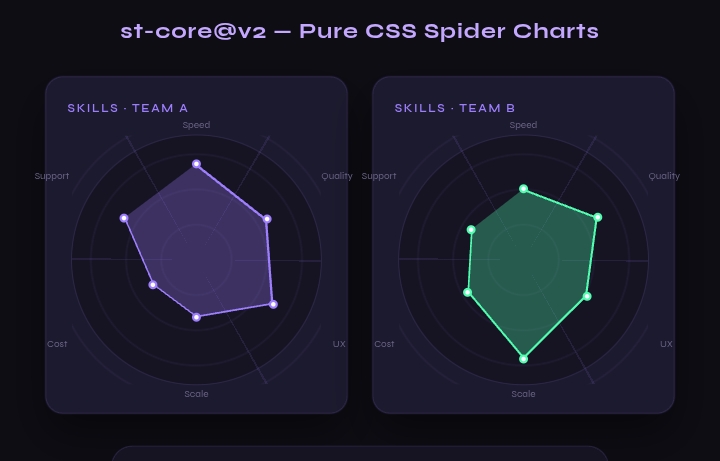
The FSCSS IDE is a full browser workspace for Figured Shorthand CSS — multi-file project, live compile, preview, components, and automation scripts — without installing a desktop app. fscss versions it works on is switchable and saves your workspace in localStorage.
Try it: fscss.devtem.org/ide
Guides: IDE guide · xfcmds guide
This article is a tour of what you actually get when you open it.
The layout at a glance
| Area | What it is |
|---|---|
| Top bar | Sidebar toggle, command palette, Run, Preview, Auto, Export / Import, theme, settings |
| Left strip | Files, Components, Snippets, Tools (+ Docs / Shortcuts) |
| Center | Tabs + Monaco editor |
| Bottom | Terminal + Problems |
| Status bar | Compiler state, errors, cursor, language, last save, fscss@x.y.z |
Drag the dividers to resize. On phones the sidebar overlays and panes stack.
Files and projects
Supported types: .fscss, .xfscss, .css, .html, .js, .xfcmd, .json, .md, .txt.
New file:
Alt+N(bare name →.fscss)Folders: paths like
components/card.fscss,ide/settings/cmd.xfcmdEntry file (★): compiles when the active tab isn’t FSCSS
Examples: basic, variables, pattern, imports, debug — one click into
examples/Welcome screen when every tab is closed
Work autosaves under keys like fside:. Export a JSON backup if the browser blocks storage.
Editor and compile
Monaco with FSCSS highlighting and snippet triggers (
def,arr,imp,pat, …)Run —
Ctrl+Enter(active or entry file)Compile + preview —
Ctrl+Shift+EnterAuto — compile ~700 ms after you stop typing (
Alt+A)Compile all — every
.fscssfileErrors land in Problems (and markers when the message has a line number)
Compiled CSS tab is read-only with copy/download. Preview builds from index.html (or a default), all compiled FSCSS, plain CSS, and JS as modules — width presets Full / 768 / 375.
Selective imports in practice
A typical module pull looks like this:
@import((
  st-root as root,
  st-chart-fill as area,
  st-chart-line as stroke,
  st-chart-points as points
) from st-core@v2)
You choose exports, rename them with as, and call the local names only, Components can insert @import((*) from "source"), and the compiler (1.2.6+) resolves chains, relative paths, and dependency @defines.
Registry packages (no quotes): st-core@v2, overlapui, circle-progress, fscss:micros, more Paths and URLs use quotes.
Components, snippets, tools
Components (Alt+2) — loads the public libs index (cached ~30 min). Search, Import, Copy, Repo.
Snippets (Alt+3) — @define, @arr, %n(), pattern(), exec(_log), … plus anything packages install when you enable them.
Tools (Alt+4) — format, beautify/minify CSS, share link, compile all, stats (size, gzip, rules, time).
Terminal and xfcmds
Open with Ctrl+`. Besides ls, open, compile, preview, libs, version, you get the package + automation layer:
| Command | Role |
|---|---|
libs / libs <q> |
List or search registry packages |
libck st-core |
Check package → prompt yes/no to enable |
libon / liboff |
Enable / disable without the long flow |
xfcmd list |
Registry commands + workspace .xfcmd files |
xfcmd name |
Run a named script (package, starter, …) |
xfcmd refresh |
Reload cmd.json from repo |
.xfcmd scripts are plain sentences (not JS): create files, add imports/snippets, compile, show panels. Registry lives in fscss-ttr/FSCSS/xfcmds. Package authors can ship enable/disable hooks; authors and power users can add workspace scripts and run xfcmd check before xfcmd run.
Example flow:
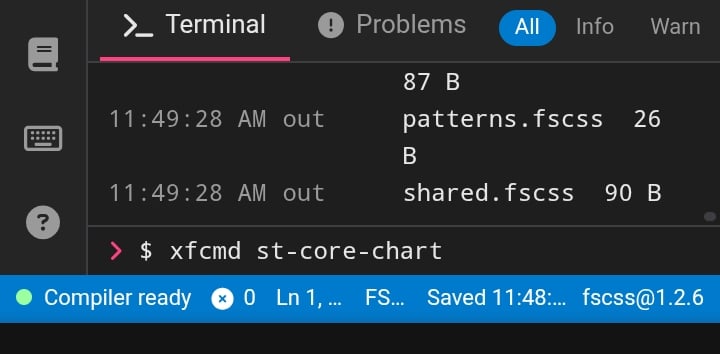
libon st-core

xfcmd st-core-chart
Then type helper names like st- in the editor for snippets.
Full sentence table and safety rules: xfcmds guide.
Export and share
Current file, compiled / minified CSS
Standalone HTML, ZIP (sources +
dist/*.css), JSON backupShare link; URL hash
#code=/#run?code=opens shared FSCSS
Production tip: prototype in the IDE, ship CLI-compiled CSS (fscss in.fscss out.css).
Settings worth knowing
Theme, font size, wrap, minimap
Entry file
Compiler version — load any
fscss@x.y.zfrom jsDelivr (esm.min.js); terminal:version 1.2.6+Debug:
window.xfscssin the browser consoleReset workspace clears
fside:keys (including enabled packages)
Keyboard cheat sheet
| Action | Keys |
|---|---|
| Compile | Ctrl+Enter |
| Compile + preview | Ctrl+Shift+Enter |
| Command palette | Ctrl+Shift+P / F1 |
| Files / Components / Snippets / Tools | Alt+1 … Alt+4 |
| New file | Alt+N |
| Terminal | Ctrl+` |
| Auto compile | Alt+A |
| Shortcuts list | Alt+/ |
Mac: Cmd instead of Ctrl.
Who it’s for
Trying FSCSS without npm
Multi-file demos (imports, partials, HTML + CSS + JS)
Pulling community modules (
st-core, charts, overlap UI, etc) with checks and snippetsSharing a reproducible workspace via ZIP / JSON / link
Not a replacement for CI or production builds — it’s the fastest place to write, compile, and see FSCSS.
Links
Open the IDE, hit Ctrl+Enter, or type xfcmd list in the terminal and explore from there.
Comments
Join the discussionNo comments yet. Be the first to comment.